Pick up where you left off
Projects“What am I working on? Open my latest project and show me its scenes.”
You need a Phantra account first. Sign in once to create your workspace, then add the connector.
https://api.phantra.ai/mcp/claudeWorks in Claude on the web, the desktop app and the phone once it is added to your account. Claude plans and writes the scene with you and prices it; you approve the render on the scene's page in your studio.
https://api.phantra.ai/mcp/claude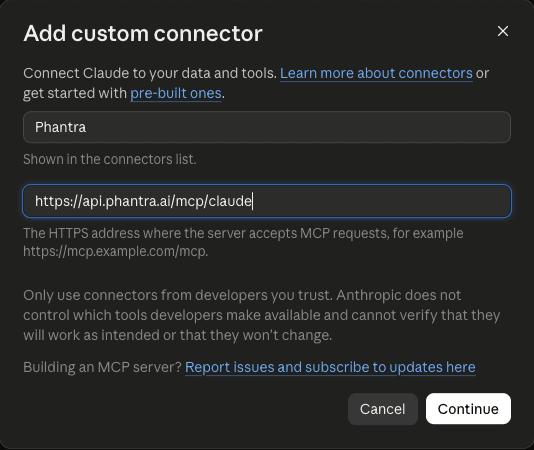
The plugin bundles this connector with 22 skills that teach Claude how to plan with the studio: storyboards, ad variations, product scenes, camera moves, UGC ads, explainers, hooks, sound and the edit. Free and open source (MIT).
One command in your terminal, then sign in once from inside Claude Code.
claude mcp add --transport http phantra-ai https://api.phantra.ai/mcp/claude/mcp, pick phantra-ai and choose Authenticate.33 tools on api.phantra.ai/mcp/claude. They read and write your own projects, scenes, elements and library. None of them draws, renders or spends credits.
projectsprojectproject_chatcreate_projectYour projects: list them, open one (brief, look, scenes, references, renders, recent chat), page its chat, start one.
elementsadd_elementThe characters, props and places a scene is held to, with their photos; add one from an image address or a product page you give.
upload_linkA one-time page where you upload a picture or a clip from your device into your studio, optionally straight onto an element.
write_sceneduplicate_scenesceneSave a scene written with you as timed shots (with what each photo is for), copy one with changes, read one back.
quotevideo_modelsrecommend_modelPrice a scene in credits beside your balance, with the link to its page in the studio where you approve the render; the models and what each takes; which model suits a job.
open_in_studioAsked for an image, a video or an edit of a render, a link that opens the Phantra studio with the prompt already in the box, where you send it, see the price and approve it.
libraryshare_linkWhat is in your library (renders and uploads); a time-limited download link for one of them.
reformattrim_clipassemble_clipsjobA clip or still in a new shape, a range of a clip, clips joined into one: free, on the studio's own server. Check on a job.
balancecredit_historywhoamirecentsearchYour credits and where they went; your workspace and plan; your latest work; search your studio.
preferencesset_preferencesYour workspace's defaults: frame, length, model, draft first.
recipesrecipesave_recipeThe studio's recipes and your own.
what_worksscore_captionWhat you kept and what reached an audience; a caption scored against your own posts.
feedbackA note to the studio.
Copy one into a Claude chat once Phantra is connected.
“What am I working on? Open my latest project and show me its scenes.”
“I want a 10-second spot for my matte black water bottle on a wet gym floor, no people. Give me three ideas, then write the one I pick as timed shots.”
“Storyboard a 30-second launch for my coffee brand as four scenes, all held to my bag and café photos.”
“What would scene 408 cost to render, and which model suits it best?”
“Make my last clip 9:16 for Reels and give me a download link.”
“How many credits do I have left, and what did I spend them on this week?”
What the connector reads and records is in the privacy policy; the terms cover the studio it reaches.